I Turned My Stream Deck Into a NetSuite Controller
I had a Stream Deck collecting dust and a NetSuite tab open. That's really the whole origin story. No grand productivity thesis. I just wanted to see if I could make the two talk to each other.
I built two plugins. Neither is going to change your life. But they were fun to make, and they work.
Plugin 1: Transaction Buttons
This one mirrors the action buttons from whatever NetSuite transaction you're looking at. Edit, Back, Close Order, Accept Payment, the whole row. They show up on the Stream Deck as physical keys.
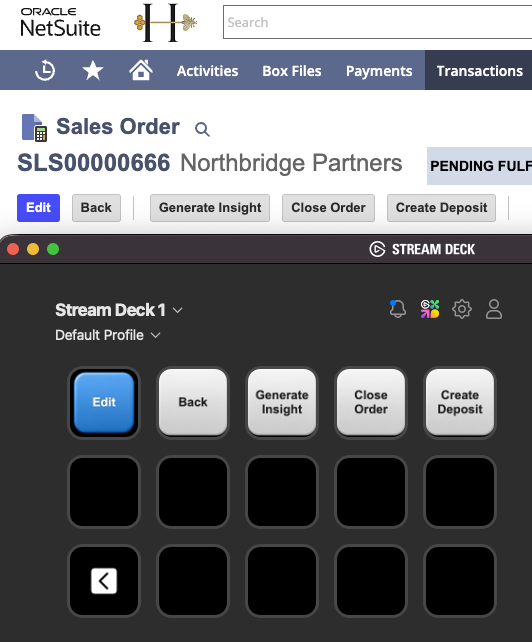
Switch to a different record and the keys update. An Invoice has different buttons than a Sales Order, and the deck picks that up automatically.
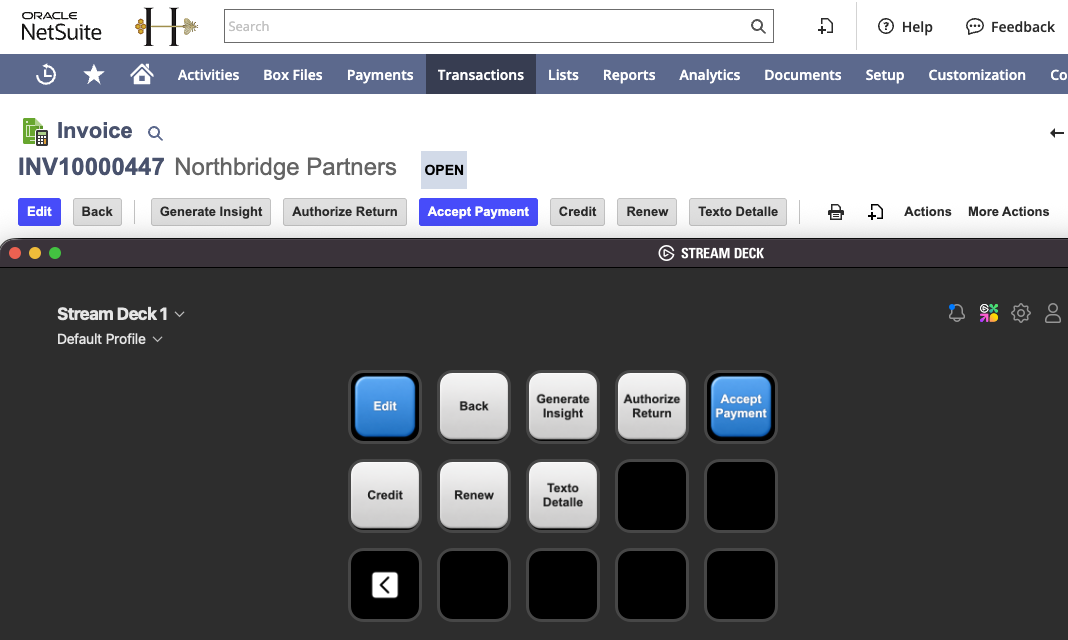
Custom buttons from SuiteScript user event scripts show up too. If someone added a "Generate PDF" button via a user event, it just appears. No extra config.
Blue keys match NetSuite's blue primary buttons. White keys match the default style.
GitHub: streamdeck-ns-txn-buttons
Plugin 2: Related Record Navigator
This one scrapes related records from the current transaction. Customer, linked Invoice, Payments, anything in the Related Records subtab or the header fields. Each one gets a key with the record type and name. Press it, Chrome opens it in a new tab.
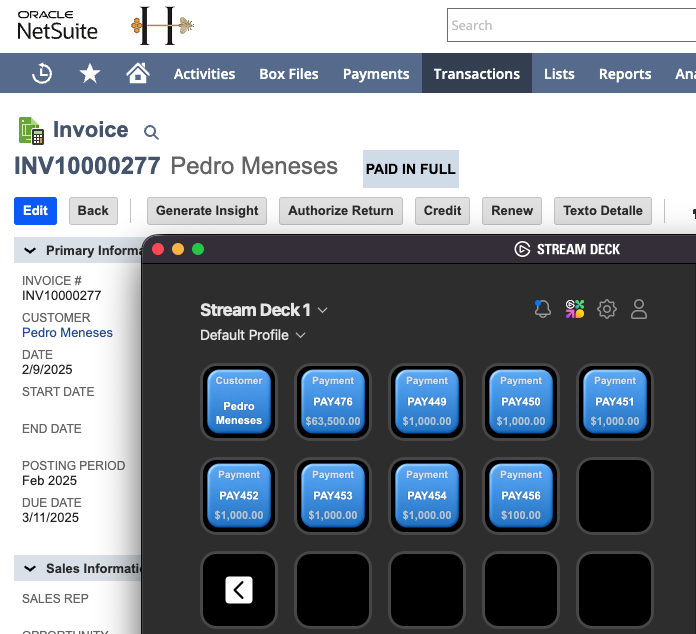
An Invoice with eight Payments fills the deck. A Sales Order with just a Customer gets one key. Empty slots go dark.
GitHub: streamdeck-ns-navigator
How it works
Both plugins use the same setup:
- A Chrome extension content script scrapes the current NetSuite page
- The extension's background script keeps a WebSocket connection to localhost:9999
- A Stream Deck plugin (Node.js) hosts that WebSocket server and pushes data to the physical keys
- Key presses go back through the same pipe to trigger clicks or navigation in Chrome
The content scripts rescan on page navigation and DOM changes, so the deck stays current as you move around.
Why a Stream Deck?
Honestly, because I had one. A hotkey or a browser popup could do the same job. The one thing I do like about physical keys is that they're labeled. I don't have to remember shortcuts. The key says "Invoice: INV10000721" and I press it.
Setup
Both plugins need:
- Stream Deck with the Elgato software (6.9+)
- Chrome with the extension loaded in developer mode
- Node.js 20+
Each repo has full instructions. Short version: npm install, npm run build, load the extension, drag action slots onto your deck.
Source
Both repos are open source. If you want to tweak which record types show up or change the button styling, the content scripts are the only files you need to touch.